WP YouTube
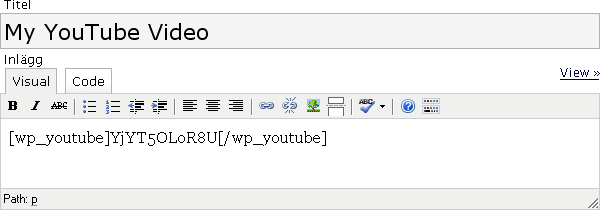
2007-11-01 @ 16:23What about a free plugin that makes your YouTube videos easier to publish? Whether you use WordPress as a blog or as a CMS this plugin helps you to present your YouTube videos without the effort to paste the whole embed-code. You only need the video ID, the rest is handled by WP YouTube. It also features YouTube options , for you to control all the YouTube videos at the same time. Then it automatically set the colors, borders, width and height.
- Version 2.0 is out. Click here to go to WP YouTube 2.0
- Download: WP YouTube 0.9
- Go to: WP YouTube 2.0
- Version: 0.9
- Works with: 2.2-2.3.1
Screenshots

Install
- Upload wp-youtube.php to the /wp-content/plugins/wp-youtube directory.
- Activate the plugin WP YouTube through the ‘Plugins’ menu in WordPress.
- Go to ‘Options / WP YouTube’ for options and more instructions.
Updates 0.9
- New feature – ”Tag type” added
- Fix – Autoplay bug fixed
- Fix – Stylesheet code removed, it wasn’t used anyway
Updates 0.8
- New feature – ”Autoplay” option added
- New feature – ”Include related videos” option added
- New feature – ”Valid XHTML code” option added
- Fix – Width and height was switched
- Fix – The ”Tag name” is now set to default value even if options is never updated
- Fix – Some visual enhancements to the instructions part
- Fix – The support link is changed and goes now directly to WP YouTube
History
Why did I make this? I’m developing a video-site when this is written and got tired of pasting and editing the embed code. After about 30 posted YouTube-videos I wanted to change the width of the site and there by the width of every movie-clip. What if I could do that in just one place, in one simple setting? I made a plugin to manage that. I figured that my plugin could be used for more than just change the width and height. YouTube videos have support for colors and borders and I brought that into the plugin as well.
- Download older versions of this plugin at WordPress – WP YouTube
Known bugs
- Calling a stylesheet that does not exists (most users don’t even notice)
- Autoplay don’t work if ”Valid XHTML code” is not set
Contribute / Feedback
The best way to contribute is to spread the word, link to this page or give me feedback. All kinds of feedback are helpful to me. Have you tested this plugin on another WordPress-version and can confirm that it works? Let me know. Suggestions and bug report are also welcome.


2010-05-06 @ 20:37
Hi
Is it possible to use this for Private Videos that I upload as private?
Thanks
2010-05-08 @ 0:46
Hey man, I could really make use of this plugin but I’m on WordPress 2.9 and it’s not working on that version :(. Can you please update the plugin? Tnx!
2010-05-20 @ 21:33
[…] WP YouTube allows you to control all the YouTube videos at the same time. […]
2010-06-06 @ 17:40
you can find this simple plugin related to yours. wp-tube plugin, it automatically embed youtube video to your posts. http://bit.ly/aqvKFD
2010-06-17 @ 22:07
header not valid. wen used in wp3
2010-06-19 @ 15:29
Hi,
i got a problem. The videos are not shown in RSS-Feeds….
Thats not good!
Any hints?
ciao
Frank
2010-06-21 @ 14:26
Very Nice Plugin. But some error is display in admin side…
2010-07-03 @ 18:11
When will you release the version which is compatible with WordPress 3.0
2010-07-11 @ 15:26
[…] WP YouTube […]
2010-09-15 @ 1:52
Anyone who gets the ”header not valid” message, look in ”plugins” -> WP Youtube, and copy everything from within the 2nd wp youtube folder into the first one and HEY PRESTO! It works.
PS This is a pretty cool plugin and saved me a few hours building one myself. ;)
2010-11-25 @ 19:23
Thanks Alex for the tip.
It helps for not showing ”header not valid”message but …. The plugin is not available in the admin panel. Obviously it’s not compatible and the tip didn’t do that.
Hello Sweden!
Can I please ask the plugin author to update it for the last WP?? Please. Folks needs you :(
2010-09-15 @ 1:52
Also, what would be cool is if this looked for a YouTube custom field and grabbed the video ID from that. Just saying ;)
2011-02-05 @ 10:58
[…] WP YouTube 0.9 Нажмите, чтобы отменить ответ. […]
2011-02-08 @ 17:26
[…] WP YouTube […]
2011-03-02 @ 3:34
great youtube plugin, easy to use
2011-03-19 @ 3:20
[…] 03. WP YouTube […]
2011-07-09 @ 13:36
[…] io invece utilizzo WP YouTube. Nella pagina di configurazione puoi scegliere il tag da utilizzare, i colori, le grandezze e tanto […]
2011-07-11 @ 14:31
Very Nice great youtube plugin. +1
2011-07-13 @ 2:23
[…] WP YouTube […]
2011-07-25 @ 17:10
[…] free Videographer theme works best with the two different plugins: WP Youtube and WP […]
2011-08-13 @ 19:30
[…] WP YouTube […]
2011-09-16 @ 17:51
[…] http://www.jenst.se/2007/11/01/wp-youtube/ […]
2011-11-19 @ 10:12
Great Plug-in thanks for download.
2012-01-09 @ 16:27
[…] http://www.jenst.se/2007/11/01/wp-youtube/ […]
2012-01-10 @ 11:59
[…] از افزونه هایی که برای اینکار نوشته شده اند، مانند WP YouTube-استفاده از پوسته مخصوص ویدئو بلاگ، مانند پوسته ی […]
2012-03-04 @ 11:34
[…] WP YouTube This plugin takes things just a step further than YouTube brackets by allowing you to only acquire the video id (i.e. Z5ErKq4o4sQ) and place it between brackets. Additionally, WP YouTube gives you the option to set a color for the video box that will remain consistent throughout your posts, designate auto-play, size, and whether or not to include related videos. […]
2012-03-10 @ 15:32
Hi, I tried to install your plug-in via the wordpress installer but it will not allow it. It says no plug-in found. Is there a reason for this or is it designed to be installed via FTP only?
Thanks
2012-05-01 @ 11:25
[…] -استفاده از افزونه هایی که برای اینکار نوشته شده اند، مانند WP YouTube […]
2012-05-08 @ 23:49
[…] что мы здесь имеем? Страница автора находится здесь – но там ничего нового мы не подчерпнем. Дальше – […]
2012-06-07 @ 16:34
[…] -استفاده از افزونه هایی که برای اینکار نوشته شده اند، مانند WP YouTube […]
2012-11-29 @ 16:30
[…] -استفاده از افزونه هایی که برای اینکار نوشته شده اند، مانند WP YouTube […]